Exchange the battery module enclosure fan
Before you begin
 Use approved ESD procedures to prevent damage.
Attention:
- This procedure is not a stand-alone procedure. Customer disruption and damage to the hardware might occur when microcode and power boundaries are not in the proper conditions for this service action.
- If a serviceable event FRU repair directed you to this procedure, the microcode and power boundaries are already set.
- If a serviceable event FRU repair did not direct you to this procedure, see MAP1230 Replace a FRU without using a serviceable event.
Notes:
- All the cables and FRUs to be removed must be uniquely identified so they can be reinstalled correctly.
- If an installed earthquake resistance kit prevents you from accessing this FRU, refer to MAP1600.
Remove the battery module enclosure fan
Procedure
- To gain full access, unfasten
 and then rotate the needed power distribution
units (PDUs) away from the rear of the rack.
and then rotate the needed power distribution
units (PDUs) away from the rear of the rack. Figure 1. Power distribution units in normal position (rack rear view) 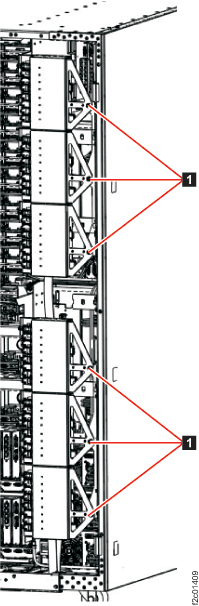
- Unscrew the screws to loosen the fan from the battery
backup unit.
Figure 2. Remove the battery backup unit fan 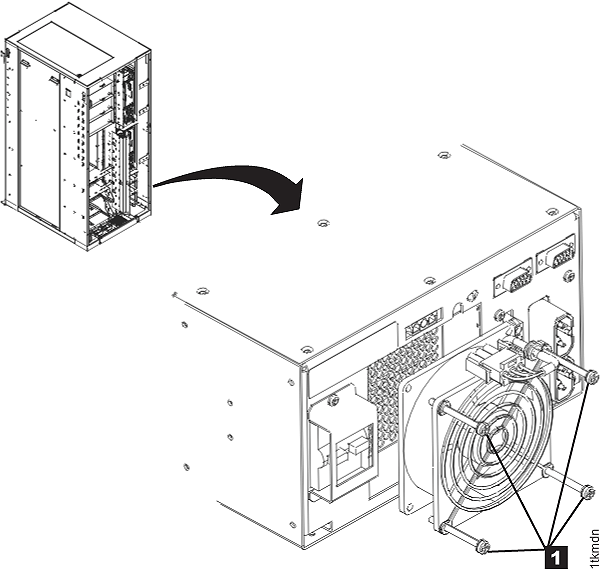
Install the battery module enclosure fan
Procedure
- Position the fan cable rubber grommet up into the sheetmetal slot and then place the fan into the fan recess.
- Install fan wire guard and the four screws . See Figure 2.
- Rotate and fasten the power distribution units (PDU) to the normal position.
- Exit this service information center parts exchange procedure and return to the procedure that sent you here.