This procedure is not a stand-alone procedure. Customer disruption and damage to the hardware
might occur when microcode and power boundaries are not in the proper conditions for this service
action.
If a serviceable event FRU repair directed you to this procedure, the microcode and power
boundaries are already set.
If there is no FRU identify indicator or location code, you
were sent here by an isolation MAP or symbolic FRU procedure. Use the information in that procedure
and the figures in this procedure to locate the proper part to exchange.
Most, but not all, FRUs have identify indicators. Use the flashing amber or solid blue FRU identify indicators to ensure that you are working
on the correct enclosure or FRU.
The light path identify LEDs are a hierarchy of LEDs that can
identify the rack, enclosure, FRU, and even the FRU connector to which a cable is
connected.
No, the rack identity card is being replaced in an expansion
rack. Go to step 5.
Remove the rack identity cables
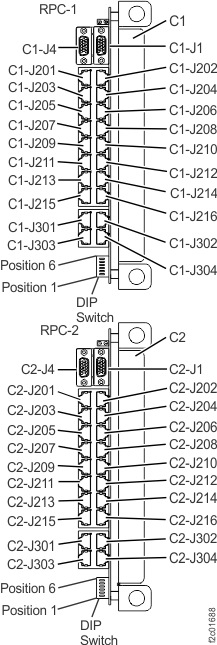
from both RPC cards, U2nnn.mmm.sssssss-C1-J1 and U2nnn.mmm.sssssss-C2-J1.
See Figure 2.
After the cables have been removed, go to step 6.
Note: This end of the rack identity card cable is disconnected
first to ensure that no unexpected signals reach the RPC card when
the cable is disconnected from the rack identity card.
Figure 2. Location codes for the RPC cards (Model 961)
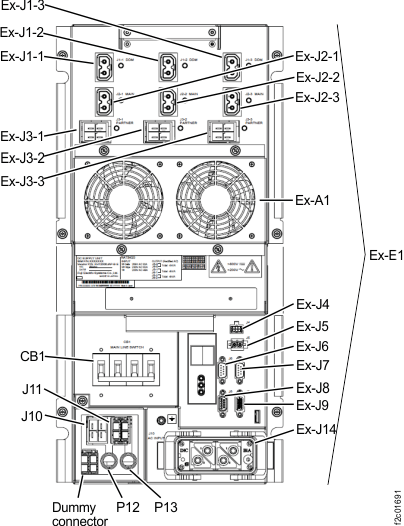
Remove the rack identity cables from both DC-UPSs, U2nnn.mmm.sssssss-E1-J8 and
U2nnn.mmm.sssssss-E2-J8. See Figure 3.
Note: This end of the rack identity card cable is disconnected first to ensure that no unexpected
signals reach the DC-UPS when the cable is
disconnected from the rack identity card.
Figure 3. Location codes for the DC-UPS (Models 961, 96E) (rear)
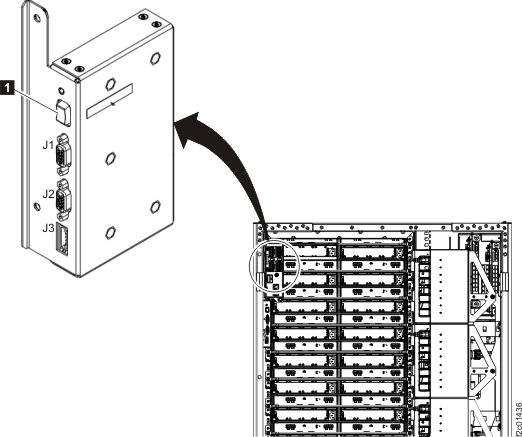
Remove the cables from the rack identity card. See Figure 4
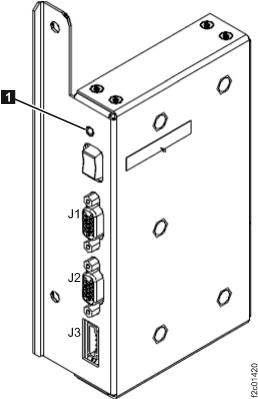
Figure 4. Rack identity card (rack version 1)
Remove the screws fastening the rack identity card to the
rack and then remove the card from the rack.
Install the rack identity card (rack version 1)
Procedure
Install the rack identity card in the rack.
Secure the rack identity card in place
by reattaching the screws .
Do not press the rack identity card white rocker switch
at any time.
The FRU verification tests for this FRU cannot detect disconnected
or cross-connected cables. Use the location code label on each cable
to ensure it is properly connected.
Reconnect all cables at the rack identity card. See Figure 4.
Reconnect the cables to J1 and J2.
Reconnect the rack operator panel cable to J3.
If you replaced the rack identity
card in Rack 1:
Reconnect the rack identity cable to RPC card connector
C1-J1. See Figure 2.
Reconnect the rack identity cable to RPC card connector
C2-J1. See Figure 2.
No. The signal to blink the ID LED comes from both RPC cards.
Ensure you properly connected the cables in step 6 and
step 7.
If they are properly connected, call the next level of support or
replace the rack identity card again.
No. The signal to blink the rack identify LED comes from the rack identity card. Ensure the
J3 cable is properly connected. At the front of the rack, open the cover and ensure the cable is
properly connected to the LED assembly. If no problems are found, call the next level of
support.
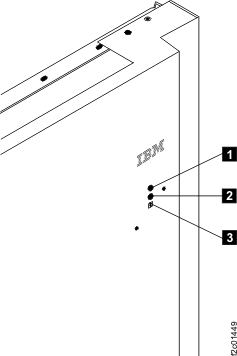
Figure 6. Rack operator panel LEDs on
upper right of rack front cover
Exit this service information center parts
exchange procedure and return to the procedure that sent you here.
Section-2 Rack Version
2
Remove the rack identity card (rack version 2)
Procedure
To locate this FRU, take one of the following actions and then return here and
continue to replace the FRU:
If there is no FRU identify indicator or location code, you
were sent here by an isolation MAP or symbolic FRU procedure. Use the information in that procedure
and the figures in this procedure to locate the proper part to exchange.
Most, but not all, FRUs have identify indicators. Use the flashing amber or solid blue FRU identify indicators to ensure that you are working
on the correct enclosure or FRU.
The light path identify LEDs are a hierarchy of LEDs that can
identify the rack, enclosure, FRU, and even the FRU connector to which a cable is
connected.
No, the rack identity card is being replaced in an expansion
rack. Go to step 5.
Remove the rack identity cables
from both RPC cards, U2nnn.mmm.sssssss-C1-J1 and U2nnn.mmm.sssssss-C2-J1.
See Figure 7.
After the cables have been removed, go to step 6.
Note: This end of the rack identity card cable is disconnected
first to ensure that no unexpected signals reach the RPC card when
the cable is disconnected from the rack identity card.
Figure 7. Location codes for the RPC cards (Model 961)
Remove the rack identity cables from both DC-UPSs, U2nnn.mmm.sssssss-E1-J8 and
U2nnn.mmm.sssssss-E2-J8. See Figure 8. After the
cables have been removed, go to step 7.
Note: This end of the rack identity card cable is disconnected first to ensure that no unexpected
signals reach the DC-UPS when the cable is
disconnected from the rack identity card.
Figure 8. Location codes for the DC-UPS (Models 961, 96E) (rear)
Remove the local remote switch card from the rack identity card
. See Figure 9.
The rack identity card will stay fully functional and will hang from it's cables, so be
careful.
Loosen screw and
slide the card to the left and down to remove it. The card tab will release from the slot .
Note: The circuit board inside the card assembly is insulated which prevents it shorting if it
touches any rack sheet metal.
Carefully let the card hang by its cables.
Figure 9. Rack identity card (Rack version 2)
Remove the cables from the rack identity card. See Figure 9.
Loosen the screw and
slide the card to the left and down to remove it. The card tab will release from the slot .
Install the rack identity card (rack version 2)
Procedure
Install the rack identity card in the rack.
Secure the rack identity card in place by tightening
the screw .
Do not press the rack identity card white rocker switch
at any time.
The FRU verification tests for this FRU cannot detect disconnected
or cross-connected cables. Use the location code label on each cable
to ensure it is properly connected.
Reconnect all cables at the rack identity card. See Figure 9.
Reconnect the cables to J1 and J2 .
Reconnect the rack operator panel cable to J3 .
If you replaced the rack identity
card in Rack 1:
Reconnect the rack identity cable to RPC card connector
C1-J1. See Figure 7.
Reconnect the rack identity cable to RPC card connector
C2-J1. See Figure 7.
No. The signal to blink the ID LED comes from both RPC cards. Ensure you properly connected
the cables in step 6 and step 7. If they are properly connected, call
the next level of support or replace the rack identity card again.
No. The signal to blink the rack identify LED comes from the rack identity card. Ensure the
J3 cable is properly connected. At the front of the rack, open the cover and ensure the cable is
properly connected to the LED assembly. If no problems are found, call the next level of
support.
Figure 10. Rack operator panel LEDs on
upper right of rack front cover
If you replaced the rack identity card in Rack 1, install
the local remote switch card to the rack identity card.
Slide the card tab into the slot while lifting the keyhole slot
up over the screw . Gently
slide the card to the right and then tighten the screw.
Exit this service information center parts
exchange procedure and return to the procedure that sent you here.
 Use approved ESD procedures to prevent damage.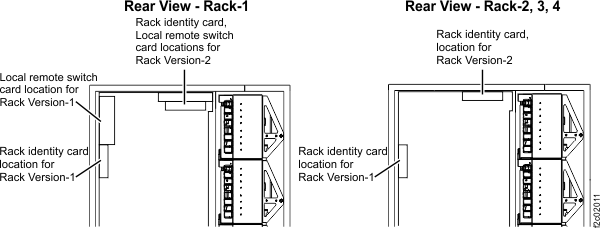
 .
. 
 . See Figure 6.
 from the rack identity card
 . See Figure 9.
 and
slide the card to the left and down to remove it. The card tab will release from the slot
and
slide the card to the left and down to remove it. The card tab will release from the slot  .
Note: The circuit board inside the card assembly is insulated which prevents it shorting if it touches any rack sheet metal.
.
Note: The circuit board inside the card assembly is insulated which prevents it shorting if it touches any rack sheet metal.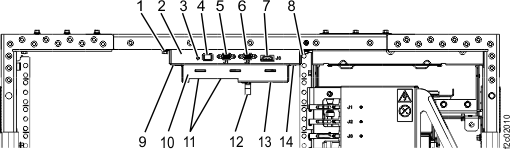
 .
.
 and J2
  .
.
 .
.