Exchange the laptop USB to Ethernet adapter (T520, T530, T540)
Before you begin
 Use approved ESD procedures to prevent damage.
Attention:
- This procedure is not a stand-alone procedure. Customer disruption and damage to the hardware might occur when microcode and power boundaries are not in the proper conditions for this service action.
- If a serviceable event FRU repair directed you to this procedure, the microcode and power boundaries are already set.
- If a serviceable event FRU repair did not direct you to this procedure, see MAP1230 Replace a FRU without using a serviceable event.
Notes:
- All the cables and FRUs to be removed must be uniquely identified so they can be reinstalled correctly.
- If an installed earthquake resistance kit prevents you from accessing this FRU, refer to MAP1600.
Remove laptop USB to Ethernet adapter
Procedure
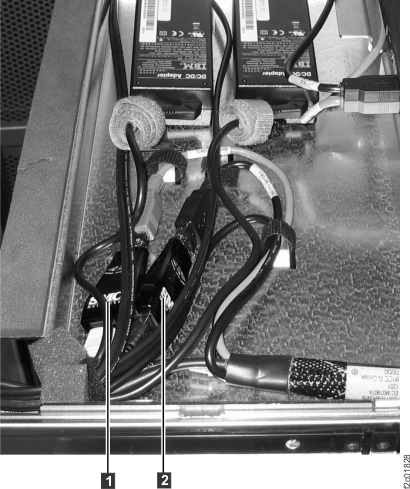
- The laptop USB
to Ethernet adapter
 or
or  is fastened on the tray behind the
laptop and is connected to the USB and Ethernet cables.
is fastened on the tray behind the
laptop and is connected to the USB and Ethernet cables. Figure 1. Laptop USB to Ethernet adapter