MAP4963 Storage enclosure PCIe cable analysis

MAP4963 Section-1

About this task

The FRU list of the serviceable event that sent you here contains:
  • MAP4963
  • Storage enclosure RAID controller card: U2107.D03.sssssss-P1-Cx or U1500.rBn.sssssss-P1-Cx
  • Storage enclosure PCIe cable, or PCIe storage interface card and cable: U1500.rBn.sssssss-P1-Cx
  • I/O enclosure PCIe/PCN card
  • Various other FRUs or symbolic procedures, based on system reference code (SRC)
Complete the following steps:

Procedure

  1. Note the FRU location of the first PCIe storage interface in the FRU list. If there is not a PCIe storage interface in the FRU list, then proceed to the next step.
    For models 98x, the PCIe storage interface can be a port on the I/O enclosure PCIe/PCN card. This procedure refers to that interface as the "affected storage interface". FRU location code format is U1500.rBn.sssssss-P1-C7-Tx where:
    • x=5 or 6
    • r = rack (1-2)
    • Bn = I/O enclosure (1-4)
    The FRU location code format can also be U1500.rBn.sssssss-P1-Cx, where:
    • x=2, 3, 5, or 6
    • r = rack (1-2)
    • Bn = I/O enclosure (1-4)
    Note: There might be multiple PCIe storage interface locations in the FRU list, as either "FRU" or as "Symbolic procedure." This procedure uses the first location on the FRU list, the "affected storage interface", as a reference point.
  2. Find the FRU location of the first PCIe storage interface in the first column of one of the following tables:
    If there is not a PCIe storage interface in the FRU list, then proceed to the next step.
    Note the following information:
    1. Physical location of the affected storage interface (format: Rr-XIn-P1-C7) or (format: Rr-XIn-P1-Cx)
    2. DA pair (link) that is associated with the affected storage interface
    3. RAID controller card that is associated with the affected storage interface (the affected RAID controller)
    4. The other PCIe storage interface and RAID controller card in the same DA pair (the "partner storage interface" and "partner RAID controller")
    5. The other PCIe storage interface in the same I/O enclosure as the affected storage interface (the "adjacent storage interface")
    6. The PCIe storage interface in the I/O enclosure slot above or below the affected storage interface (the "vertically adjacent storage interface")

    Point-to-point diagrams are provided at the end of this procedure if needed. See Figure 1, Figure 2, Figure 3, Figure 4, Figure 5, Figure 6, and Figure 7.

    Example for Model 981, FRU location U1500.1B4.RJ26817-P1-C7-T6:
    • The affected storage interface is:  R1-XI4-P1-C7-T6 (18B)
    • The DA pair is 18 (links 18A and 18B)
    • The affected RAID controller is:  R1-B04-P1-C2 (18B)
    • The partner storage interface is:  R1-XI3-P1-C7-T5 (18A)
    • The partner RAID controller is:  R1-B04-P1-C1 (18A)
    • The adjacent storage interface is:  R1-XI4-P1-C7-T5 (19A) (same I/O enclosure as affected)
    • The vertically adjacent storage interface is:  R1-XI2-P1-C7-T6 (16B) (same interface in I/O enclosure above the affected enclosure)
    Table 1. Storage enclosure PCIe cabling matrix - Models 981, 98E (with HPFE Gen1)
    FRU location From: Physical location of PCIe storage interface (cable port is T5 or T6) To: Physical location of RAID controller card (cable port is T3) DA Pair (link)
    Note: For HPFE Gen2 locations, see Table 2 (single-phase) or Table 3 (three-phase).
    U1500.1B3.sssssss-P1-C7-T5 R1-XI3-P1-C7-T5 R1-B04-P1-C1 18A
    U1500.1B4.sssssss-P1-C7-T6 R1-XI4-P1-C7-T6 R1-B04-P1-C2 18B
    U1500.1B1.sssssss-P1-C7-T5 R1-XI1-P1-C7-T5 R1-B03-P1-C1 16A
    U1500.1B2.sssssss-P1-C7-T6 R1-XI2-P1-C7-T6 R1-B03-P1-C2 16B
    U1500.1B3.sssssss-P1-C7-T6 R1-XI3-P1-C7-T6 R1-B02-P1-C2 19B
    U1500.1B4.sssssss-P1-C7-T5 R1-XI4-P1-C7-T5 R1-B02-P1-C1 19A
    U1500.1B1.sssssss-P1-C7-T6 R1-XI1-P1-C7-T6 R1-B01-P1-C2 17B
    U1500.1B2.sssssss-P1-C7-T5 R1-XI2-P1-C7-T5 R1-B01-P1-C1 17A
    U1500.2B3.sssssss-P1-C7-T5 R2-XI3-P1-C7-T5 R2-B04-P1-C1 22A
    U1500.2B4.sssssss-P1-C7-T6 R2-XI4-P1-C7-T6 R2-B04-P1-C2 22B
    U1500.2B1.sssssss-P1-C7-T5 R2-XI1-P1-C7-T5 R2-B03-P1-C1 20A
    U1500.2B2.sssssss-P1-C7-T6 R2-XI2-P1-C7-T6 R2-B03-P1-C2 20B
    U1500.2B3.sssssss-P1-C7-T6 R2-XI3-P1-C7-T6 R2-B02-P1-C2 23B
    U1500.2B4.sssssss-P1-C7-T5 R2-XI4-P1-C7-T5 R2-B02-P1-C1 23A
    U1500.2B1.sssssss-P1-C7-T6 R2-XI1-P1-C7-T6 R2-B01-P1-C2 21B
    U1500.2B2.sssssss-P1-C7-T5 R2-XI2-P1-C7-T5 R2-B01-P1-C1 21A
    Table 2. Storage enclosure PCIe cabling matrix - Models 981, 98E (single-phase power) (with HPFE Gen2)
    FRU location From: Physical location of PCIe storage interface (cable port is T5 or T6) To: Physical location of RAID controller card (cable port is T3) DA Pair (link)
    U1500.1B3.sssssss-P1-C7-T6 R1-XI3-P1-C7-T6 R1-M08-P1-C2 19B
    U1500.1B4.sssssss-P1-C7-T5 R1-XI4-P1-C7-T5 R1-M08-P1-C1 19A
    U1500.1B1.sssssss-P1-C7-T6 R1-XI1-P1-C7-T6 R1-M06-P1-C2 17B
    U1500.1B2.sssssss-P1-C7-T5 R1-XI2-P1-C7-T5 R1-M06-P1-C1 17A
    U1500.2B3.sssssss-P1-C7-T6 R2-XI3-P1-C7-T6 R2-M12-P1-C2 23B
    U1500.2B4.sssssss-P1-C7-T5 R2-XI4-P1-C7-T5 R2-M12-P1-C1 23A
    U1500.2B1.sssssss-P1-C7-T6 R2-XI1-P1-C7-T6 R2-M10-P1-C2 21B
    U1500.2B2.sssssss-P1-C7-T5 R2-XI2-P1-C7-T5 R2-M10-P1-C1 21A
    Table 3. Storage enclosure PCIe cabling matrix - Models 981, 98E (three-phase power) (with HPFE Gen2)
    FRU location From: Physical location of PCIe storage interface (cable port is T5 or T6) To: Physical location of RAID controller card (cable port is T3) DA Pair (link)
    U1500.1B3.sssssss-P1-C7-T6 R1-XI3-P1-C7-T6 R1-M06-P1-C2 19B
    U1500.1B4.sssssss-P1-C7-T5 R1-XI4-P1-C7-T5 R1-M06-P1-C1 19A
    U1500.1B1.sssssss-P1-C7-T6 R1-XI1-P1-C7-T6 R1-M04-P1-C2 17B
    U1500.1B2.sssssss-P1-C7-T5 R1-XI2-P1-C7-T5 R1-M04-P1-C1 17A
    U1500.2B3.sssssss-P1-C7-T6 R2-XI3-P1-C7-T6 R2-M10-P1-C2 23B
    U1500.2B4.sssssss-P1-C7-T5 R2-XI4-P1-C7-T5 R2-M10-P1-C1 23A
    U1500.2B1.sssssss-P1-C7-T6 R2-XI1-P1-C7-T6 R2-M08-P1-C2 21B
    U1500.2B2.sssssss-P1-C7-T5 R2-XI2-P1-C7-T5 R2-M08-P1-C1 21A
    Table 4. Storage enclosure PCIe cabling matrix - Models 980, 98B (with HPFE Gen1)
    FRU location From: Physical location of PCIe storage interface (cable port is T5 or T6) To: Physical location of RAID controller card (cable port is T3) DA Pair (link)
    Note: For HPFE Gen2 locations, see Table 5.
    U1500.1B3.sssssss-P1-C7-T5 R1-XI3-P1-C7-T5 R1-B04-P1-C1 18A
    U1500.1B4.sssssss-P1-C7-T6 R1-XI4-P1-C7-T6 R1-B04-P1-C2 18B
    U1500.1B3.sssssss-P1-C7-T6 R1-XI3-P1-C7-T6 R1-B02-P1-C2 19B
    U1500.1B4.sssssss-P1-C7-T5 R1-XI4-P1-C7-T5 R1-B02-P1-C1 19A
    U1500.2B3.sssssss-P1-C7-T5 R2-XI3-P1-C7-T5 R2-B04-P1-C1 22A
    U1500.2B4.sssssss-P1-C7-T6 R2-XI4-P1-C7-T6 R2-B04-P1-C2 22B
    U1500.2B3.sssssss-P1-C7-T6 R2-XI3-P1-C7-T6 R2-B02-P1-C2 23B
    U1500.2B4.sssssss-P1-C7-T5 R2-XI4-P1-C7-T5 R2-B02-P1-C1 23A
    Table 5. Storage enclosure PCIe cabling matrix - Models 980, 98B (with HPFE Gen2)
    FRU location From: Physical location of PCIe storage interface (cable port is T5 or T6) To: Physical location of RAID controller card (cable port is T3) DA Pair (link)
    U1500.1B3.sssssss-P1-C7-T6 R1-XI3-P1-C7-T6 R1-M10-P1-C2 19B
    U1500.1B4.sssssss-P1-C7-T5 R1-XI4-P1-C7-T5 R1-M10-P1-C1 19A
    U1500.2B3.sssssss-P1-C7-T6 R2-XI3-P1-C7-T6 R2-M12-P1-C2 23B
    U1500.2B4.sssssss-P1-C7-T5 R2-XI4-P1-C7-T5 R2-M12-P1-C1 23A
    Table 6. Storage enclosure PCIe cabling matrix - Models 982, 98F (with HPFE Gen1)
    FRU location From: Physical location of PCIe storage interface (cable port is T1, T5 or T6) To: Physical location of RAID controller card (cable port is T3) DA Pair (link)
    U1500.1B1.sssssss-P1-C3-T1 R1-XI1-P1-C3-T1 R1-B03-P1-C1 8A
    U1500.1B2.sssssss-P1-C6-T1 R1-XI2-P1-C6-T1 R1-B03-P1-C2 8B
    U1500.1B2.sssssss-P1-C3-T1 R1-XI2-P1-C3-T1 R1-B01-P1-C1 9A
    U1500.1B1.sssssss-P1-C6-T1 R1-XI1-P1-C6-T1 R1-B01-P1-C2 9B
    U1500.1B3.sssssss-P1-C3-T1 R1-XI3-P1-C3-T1 R1-B04-P1-C1 10A
    U1500.1B4.sssssss-P1-C6-T1 R1-XI4-P1-C6-T1 R1-B04-P1-C2 10B
    U1500.1B4.sssssss-P1-C3-T1 R1-XI4-P1-C3-T1 R1-B02-P1-C1 11A
    U1500.1B3.sssssss-P1-C6-T1 R1-XI3-P1-C6-T1 R1-B02-P1-C2 11B
    U1500.2B1.sssssss-P1-C3-T1 R2-XI1-P1-C3-T1 R1-B11-P1-C1 12A
    U1500.2B2.sssssss-P1-C6-T1 R2-XI2-P1-C6-T1 R1-B11-P1-C2 12B
    U1500.2B2.sssssss-P1-C3-T1 R2-XI2-P1-C3-T1 R1-B09-P1-C1 13A
    U1500.2B1.sssssss-P1-C6-T1 R2-XI1-P1-C6-T1 R1-B09-P1-C2 13B
    U1500.2B3.sssssss-P1-C3-T1 R2-XI3-P1-C3-T1 R1-B12-P1-C1 14A
    U1500.2B4.sssssss-P1-C6-T1 R2-XI4-P1-C6-T1 R1-B12-P1-C2 14B
    U1500.2B4.sssssss-P1-C3-T1 R2-XI4-P1-C3-T1 R1-B10-P1-C1 15A
    U1500.2B3.sssssss-P1-C6-T1 R2-XI3-P1-C6-T1 R1-B10-P1-C2 15B
    U1500.1B1.sssssss-P1-C7-T5 R1-XI1-P1-C7-T5 R1-B07-P1-C1 16A
    U1500.1B2.sssssss-P1-C7-T6 R1-XI2-P1-C7-T6 R1-B07-P1-C2 16B
    U1500.1B2.sssssss-P1-C7-T5 R1-XI2-P1-C7-T5 R1-B05-P1-C1 17A
    U1500.1B1.sssssss-P1-C7-T6 R1-XI1-P1-C7-T6 R1-B05-P1-C2 17B
    U1500.1B3.sssssss-P1-C7-T5 R1-XI3-P1-C7-T5 R1-B08-P1-C1 18A
    U1500.1B4.sssssss-P1-C7-T6 R1-XI4-P1-C7-T6 R1-B08-P1-C2 18B
    U1500.1B4.sssssss-P1-C7-T5 R1-XI4-P1-C7-T5 R1-B06-P1-C1 19A
    U1500.1B3.sssssss-P1-C7-T6 R1-XI3-P1-C7-T6 R1-B06-P1-C2 19B
    U1500.2B1.sssssss-P1-C7-T5 R2-XI1-P1-C7-T5 R1-B15-P1-C1 20A
    U1500.2B2.sssssss-P1-C7-T6 R2-XI2-P1-C7-T6 R1-B15-P1-C2 20B
    U1500.2B2.sssssss-P1-C7-T5 R2-XI2-P1-C7-T5 R1-B13-P1-C1 21A
    U1500.2B1.sssssss-P1-C7-T6 R2-XI1-P1-C7-T6 R1-B13-P1-C2 21B
    U1500.2B3.sssssss-P1-C7-T5 R2-XI3-P1-C7-T5 R1-B16-P1-C1 22A
    U1500.2B4.sssssss-P1-C7-T6 R2-XI4-P1-C7-T6 R1-B16-P1-C2 22B
    U1500.2B4.sssssss-P1-C7-T5 R2-XI4-P1-C7-T5 R1-B14-P1-C1 23A
    U1500.2B3.sssssss-P1-C7-T6 R2-XI3-P1-C7-T6 R1-B14-P1-C2 23B
    Table 7. Storage enclosure PCIe cabling matrix - Models 984, 84E
    FRU location From: Physical location of PCIe storage interface (cable port is T5 or T6) To: Physical location of RAID controller card (cable port is T7) DA Pair (link)
    Note: For all-flash locations, see Table 8.
    U1500.1B3.sssssss-P1-C7-T5 R1-XI3-P1-C7-T5 R1-M04-C1 18A
    U1500.1B4.sssssss-P1-C7-T6 R1-XI4-P1-C7-T6 R1-M04-C2 18B
    U1500.2B3.sssssss-P1-C7-T5 R2-XI3-P1-C7-T5 R2-M04-C1 22A
    U1500.2B4.sssssss-P1-C7-T6 R2-XI4-P1-C7-T6 R2-M04-C2 22B
    Table 8. Storage enclosure PCIe cabling matrix - Model 984 all-flash
    FRU location From: Physical location of PCIe storage interface (cable port is T5 or T6) To: Physical location of RAID controller card (cable port is T7) DA Pair (link)
    U1500.1B3.sssssss-P1-C7-T5 R1-XI3-P1-C7-T5 R1-M04-C1 18A
    U1500.1B4.sssssss-P1-C7-T6 R1-XI4-P1-C7-T6 R1-M04-C2 18B
    U1500.1B3.sssssss-P1-C7-T6 R1-XI3-P1-C7-T6 R1-M02-C2 19B
    U1500.1B4.sssssss-P1-C7-T5 R1-XI4-P1-C7-T5 R1-M02-C1 19A
    U1500.1B1.sssssss-P1-C7-T5 R1-XI1-P1-C7-T5 R1-M08-C1 16A
    U1500.1B2.sssssss-P1-C7-T6 R1-XI2-P1-C7-T6 R1-M08-C2 16B
    U1500.1B1.sssssss-P1-C7-T6 R1-XI1-P1-C7-T6 R1-M06-C2 17B
    U1500.1B2.sssssss-P1-C7-T5 R1-XI2-P1-C7-T5 R1-M06-C1 17A
    Table 9. Storage enclosure PCIe cabling matrix - Models 985, 986, 85E, 86E
    FRU location From: Physical location of PCIe storage interface (cable port is T5 or T6) To: Physical location of RAID controller card (cable port is T7) DA Pair (link)
    Note: For all-flash locations, see Table 10.
    U1500.1B3.sssssss-P1-C7-T5 R1-XI3-P1-C7-T5 R1-M04-C1 18A
    U1500.1B4.sssssss-P1-C7-T6 R1-XI4-P1-C7-T6 R1-M04-C2 18B
    U1500.1B1.sssssss-P1-C7-T5 R1-XI1-P1-C7-T5 R1-M02-C1 16A
    U1500.1B2.sssssss-P1-C7-T6 R1-XI2-P1-C7-T6 R1-M02-C2 16B
    U1500.2B3.sssssss-P1-C7-T5 R2-XI3-P1-C7-T5 R2-M04-C1 22A
    U1500.2B4.sssssss-P1-C7-T6 R2-XI4-P1-C7-T6 R2-M04-C2 22B
    U1500.2B1.sssssss-P1-C7-T5 R2-XI1-P1-C7-T5 R2-M02-C1 20A
    U1500.2B2.sssssss-P1-C7-T6 R2-XI2-P1-C7-T6 R2-M02-C2 20B
    Table 10. Storage enclosure PCIe cabling matrix - Models 985, 986, 85E, 86E all-flash
    FRU location From: Physical location of PCIe storage interface (cable port is T5 or T6) To: Physical location of RAID controller card (cable port is T7) DA Pair (link)
    U1500.1B3.sssssss-P1-C7-T5 R1-XI3-P1-C7-T5 R1-M04-C1 18A
    U1500.1B4.sssssss-P1-C7-T6 R1-XI4-P1-C7-T6 R1-M04-C2 18B
    U1500.1B1.sssssss-P1-C7-T5 R1-XI1-P1-C7-T5 R1-M02-C1 16A
    U1500.1B2.sssssss-P1-C7-T6 R1-XI2-P1-C7-T6 R1-M02-C2 16B
    U1500.1B3.sssssss-P1-C7-T6 R1-XI3-P1-C7-T6 R1-M08-C2 19B
    U1500.1B4.sssssss-P1-C7-T5 R1-XI4-P1-C7-T5 R1-M08-C1 19A
    U1500.1B1.sssssss-P1-C7-T6 R1-XI1-P1-C7-T6 R1-M06-C2 17B
    U1500.1B2.sssssss-P1-C7-T5 R1-XI2-P1-C7-T5 R1-M06-C1 17A
    U1500.2B3.sssssss-P1-C7-T5 R2-XI3-P1-C7-T5 R2-M04-C1 22A
    U1500.2B4.sssssss-P1-C7-T6 R2-XI4-P1-C7-T6 R2-M04-C2 22B
    U1500.2B1.sssssss-P1-C7-T5 R2-XI1-P1-C7-T5 R2-M02-C1 20A
    U1500.2B2.sssssss-P1-C7-T6 R2-XI2-P1-C7-T6 R2-M02-C2 20B
    U1500.2B3.sssssss-P1-C7-T6 R2-XI3-P1-C7-T6 R2-M08-C2 23B
    U1500.2B4.sssssss-P1-C7-T5 R2-XI4-P1-C7-T5 R2-M08-C1 23A
    U1500.2B1.sssssss-P1-C7-T6 R2-XI1-P1-C7-T6 R2-M06-C2 21B
    U1500.2B2.sssssss-P1-C7-T5 R2-XI2-P1-C7-T5 R2-M06-C1 21A
    Table 11. Storage enclosure PCIe cabling matrix - Models 988, 88E
    FRU location From: Physical location of PCIe storage interface (cable port is T5 or T6) To: Physical location of RAID controller card (cable port is T7) DA Pair (link)
    U1500.1B1.sssssss-P1-C7-T5 R1-XI1-P1-C7-T5 R1-M06-C1 16A
    U1500.1B2.sssssss-P1-C7-T6 R1-XI2-P1-C7-T6 R1-M06-C2 16B
    U1500.1B2.sssssss-P1-C7-T5 R1-XI2-P1-C7-T5 R1-M02-C1 17A
    U1500.1B1.sssssss-P1-C7-T6 R1-XI1-P1-C7-T6 R1-M02-C2 17B
    U1500.1B3.sssssss-P1-C7-T5 R1-XI3-P1-C7-T5 R1-M08-C1 18A
    U1500.1B4.sssssss-P1-C7-T6 R1-XI4-P1-C7-T6 R1-M08-C2 18B
    U1500.1B4.sssssss-P1-C7-T5 R1-XI4-P1-C7-T5 R1-M04-C1 19A
    U1500.1B3.sssssss-P1-C7-T6 R1-XI3-P1-C7-T6 R1-M04-C2 19B
    U1500.2B1.sssssss-P1-C7-T5 R2-XI1-P1-C7-T5 R2-M10-C1 20A
    U1500.2B2.sssssss-P1-C7-T6 R2-XI2-P1-C7-T6 R2-M10-C2 20B
    U1500.2B2.sssssss-P1-C7-T5 R2-XI2-P1-C7-T5 R2-M06-C1 21A
    U1500.2B1.sssssss-P1-C7-T6 R2-XI1-P1-C7-T6 R2-M06-C2 21B
    U1500.2B3.sssssss-P1-C7-T5 R2-XI3-P1-C7-T5 R2-M12-C1 22A
    U1500.2B4.sssssss-P1-C7-T6 R2-XI4-P1-C7-T6 R2-M12-C2 22B
    U1500.2B4.sssssss-P1-C7-T5 R2-XI4-P1-C7-T5 R2-M08-C1 23A
    U1500.2B3.sssssss-P1-C7-T6 R2-XI3-P1-C7-T6 R2-M08-C2 23B
  3. Did the serviceable event that sent you here occur during an MES to install high-performance flash enclosures?
  4. Go to MAP4963 Section-3, Error isolation for power subsystem. If you were directed back to this step from MAP4963 Section-3, Error isolation for power subsystem, then continue to step 5.
  5. For each of the following locations, confirm that the PCIe cable is not damaged and is securely connected to the correct adapter and port:
    • Both (affected and partner) storage enclosure RAID controllers in the DA pair
    • Both (affected and partner) PCIe storage interfaces in the DA pair
    • The adjacent storage interface

    See the point-to-point diagrams in Figure 1, Figure 2, Figure 3, Table 7, Table 9, or Table 11.

    The most likely locations for a disconnected or incorrectly connected cable are listed in Table 12:
    Table 12. Possible locations for damaged, disconnected, or crossed cables
    SRC Possible location of cause
    BE1E2546
    BE1E255B
    BE382565
    BE382573
    BE382577
    BE820180
    BE820188
    BE3825C3
    Any other SRCs not specifically listed in this Table
    Affected storage interface
    Affected RAID controller
    BE340048 Affected storage interface
    Adjacent storage interface (same I/O enclosure)
    Affected RAID controller
    Partner RAID controller (same storage enclosure)
    BE3400E9 Affected storage interface
    Vertically adjacent storage interface (same slot in I/O enclosure above or below affected storage interface)
    BE3400EA Affected storage interface
    Adjacent storage interface (same I/O enclosure)
    BE3400EB Affected RAID controller
    Partner RAID controller (same storage enclosure)
  6. Are any cables disconnected, damaged, or connected to the wrong adapter?
    • Yes, at least one cable is disconnected, damaged, or connected to the wrong adapter. Go to step 8.
    • No, the cables are correctly connected and are not damaged. Go to step 7.
  7. A visual inspection confirmed that the cables are correctly connected and are not damaged.
    SRC Action
    BE3400EA or BE3400EB Contact your next level of support. A system check detected crossed cabling but a visual inspection confirmed that cables are not crossed.
    BE1E2546, BE1E255B, BE340048, BE382565, BE382573, BE382577, BE820180, BE820188
    BE3825C3
    Any other SRCs not specifically listed in this Table
    Continue the repair, replacing the next FRU in the FRU list. Exit this MAP.
    Answer the following questions to continue the repair process with the next FRU on the FRU list.
    1. To the question
      What was the result of using the service procedure?
      click Problem not fixed and then click Next.
    2. To the question
      Did you exchange any parts?
      click No and then click Next.
    3. To the question
      Did you isolate the problem?
      click No and then click Next.
  8. Is a cable damaged?
    • Yes, a cable is damaged. Replace the storage enclosure PCIe cable in the FRU list.
      Answer the following questions to continue the repair process with the next FRU on the FRU list.
      1. To the question
        What was the result of using the service procedure?
        click Problem not fixed and then click Next.
      2. To the question
        Did you exchange any parts?
        click No and then click Next.
      3. To the question
        Did you isolate the problem?
        click No and then click Next.
    • No, a cable is disconnected or is connected to the wrong adapter. Go to step 9.
  9. A cable is disconnected or is connected to the wrong adapter.
    SRC Action
    BE1E2546, BE382565, BE382573, BE382577, BE820180, BE820188
    BE3825C3
    Any other SRCs not specifically listed in this table
    Continue the repair of this serviceable event with the next FRU on the FRU list (the affected storage enclosure RAID controller card).
    When directed to exchange the FRU, instead reconnect the disconnected cable.
    Answer the following questions to continue the repair process with the next FRU on the FRU list.
    1. To the question
      What was the result of using the service procedure?
      click Problem not fixed and then click Next.
    2. To the question
      Did you exchange any parts?
      click No and then click Next.
    3. To the question
      Did you isolate the problem?
      click No and then click Next.
    BE1E255B Did the serviceable event that sent you here occur during a failed I/O enclosure repair?
    • Yes. The disconnected or incorrectly connected cable must be corrected by pseudo repairing the I/O enclosure PCIe/PCN card FRU. Return to the repair screen that you followed to this point and do a pseudo repair of the FRU. A pseudo repair means continuing with the normal FRU replacement procedures, but the FRU is not actually replaced. When directed to exchange the FRU, correct the cable connections and continue.

      Read all of the following substeps before doing substep 9.a, which closes this information center window. To view this MAP in a separate information center window, click Help in the upper right corner of the main HMC GUI screen and go to the MAP.

      1. Click Close in the current service information window.
      2. One or more HMC repair screens might prompt you for the result of using the service procedure in the MAP. Select Problem not fixed.
      3. Select No when prompted for whether you exchanged any parts.
      4. Select Yes when prompted for whether you isolated the problem.
      5. Select the I/O enclosure PCIe/PCN card from the FRU list. Click Next. If the FRU is not listed, select Show more FRUs. If it is still not listed, you must manually select the FRU by using the procedure MAP1230 Replace a FRU without using a serviceable event.
      6. The HMC begins the FRU exchange process for the selected FRU.
    • No. Continue the repair of this serviceable event with the next FRU on the FRU list (the affected storage enclosure RAID controller card). When directed to exchange the FRU, instead reconnect the disconnected cable.
    BE340048, BE3400EA, BE3400EB This situation is the result of a repair action. Do the same repair again as a pseudo-repair. When directed to exchange the FRU, correct the cable connections and continue.
    BE3400E9 This situation is the result of an invalid cabling scenario. Contact next level of support.
    Figure 1. PCIe cable connections (models 981, 98E) (rear)
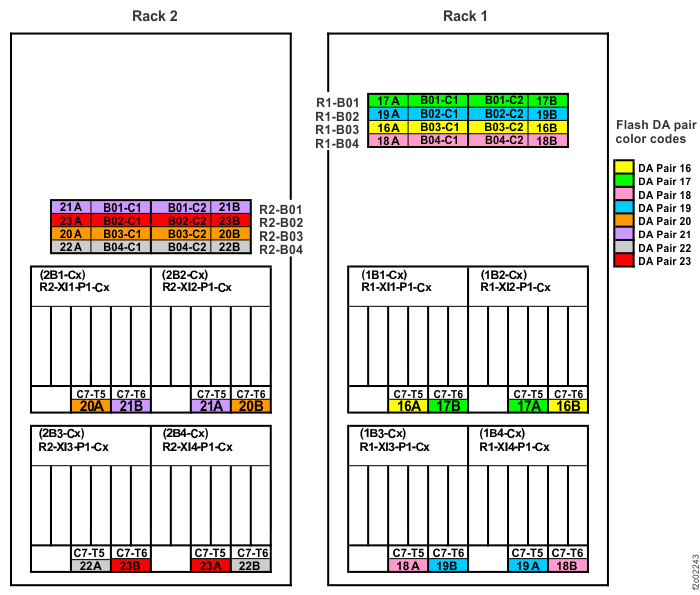
    PCIe cable connections (models 981, 98E) (rear)
    Figure 2. PCIe cable connections (models 980, 98B) (rear)
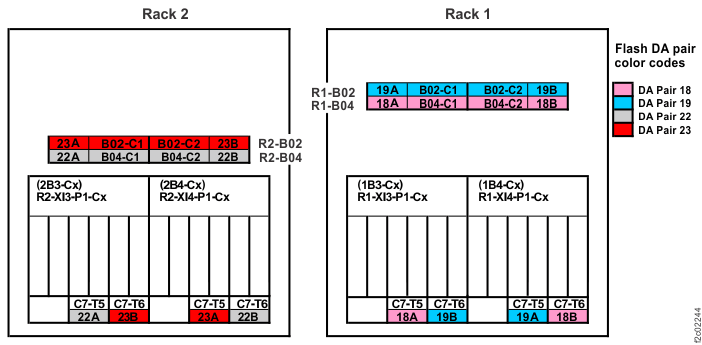
    PCIe cable connections (models 980, 98B) (rear)
    Figure 3. PCIe cable connections (models 982, 98F) (rear)
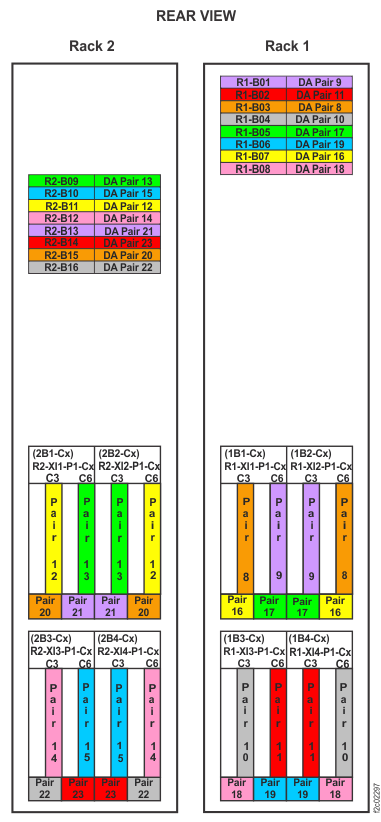
    Device adapter pair IDs for storage enclosures (Models 982, 98F) (rear view, racks 1 and 2)
    Figure 4. Point-to-point cabling diagram for storage enclosure FC-AL and Flash PCIe / SAS cables (Models 984, 84E, rear view, racks 1, 2)
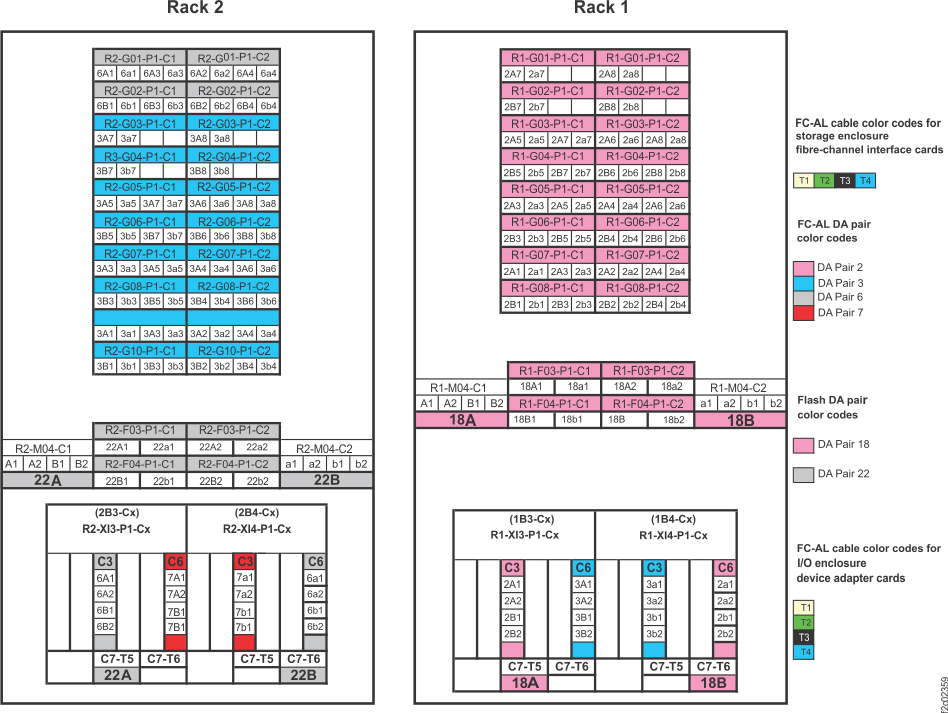
    Point-to-point cabling diagram for storage enclosure FC-AL and Flash PCIe / SAS cables (Models 984, 84E, rear view, racks 1, 2)
    Figure 5. Point-to-point cabling diagram for storage enclosure FC-AL and Flash PCIe / SAS cables (Models 985, 85E, single-phase power, rear view, racks 1, 2)
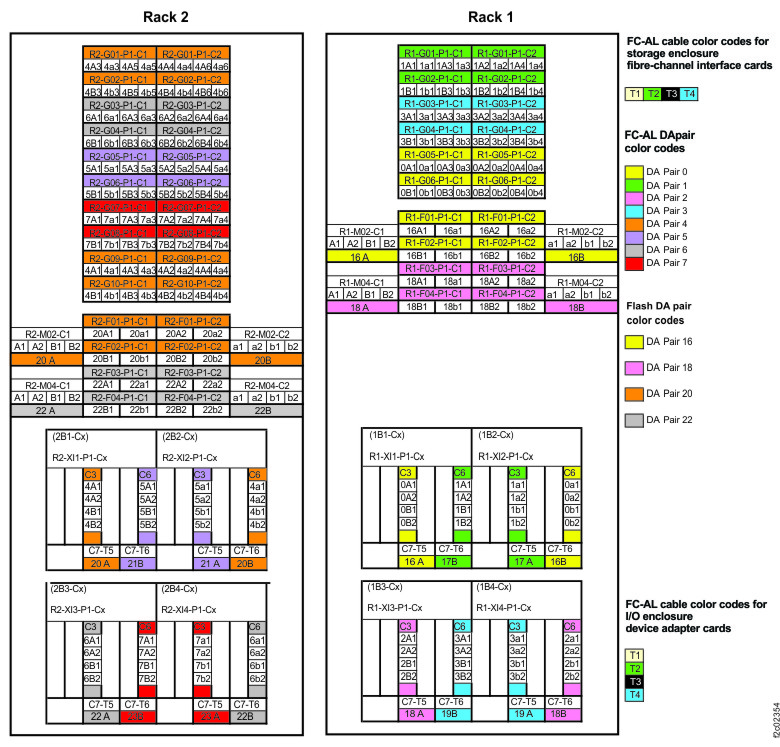
    Point-to-point cabling diagram for storage enclosure FC-AL and Flash PCIe / SAS cables (Models 985, 85E, single-phase power, rear view, racks 1, 2)
    Figure 6. Point-to-point cabling diagram for storage enclosure FC-AL and Flash PCIe / SAS cables (Models 986, 86E, three-phase power, rear view, racks 1, 2)
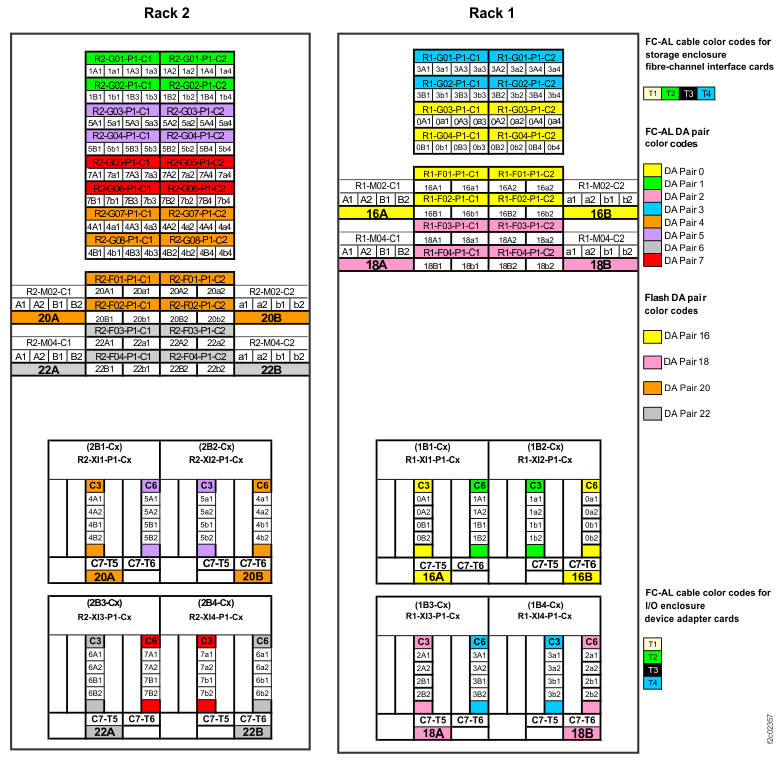
    Point-to-point cabling diagram for storage enclosure FC-AL and Flash PCIe / SAS cables (Models 986, 86E, three-phase power, rear view, racks 1, 2)
    Figure 7. Point-to-point cabling diagram for storage enclosure Flash PCIe / SAS cables (Models 988, 88E, rear view, racks 1, 2)
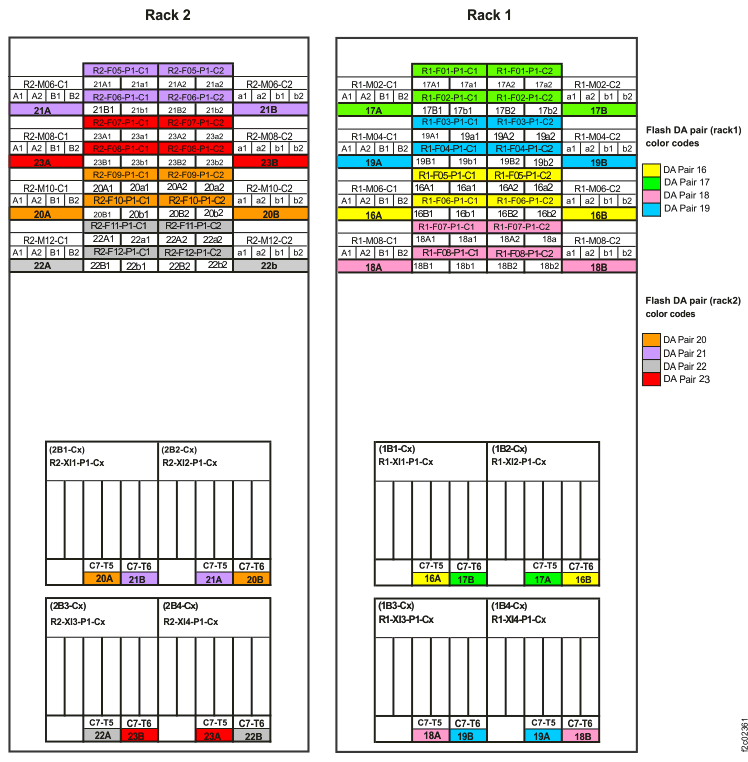
    Point-to-point cabling diagram for storage enclosure Flash PCIe / SAS cables (Models 988, 88E, rear view, racks 1, 2)

MAP4963 Section-2, Error during flash enclosure installation

About this task

You are here because a serviceable event calling MAP4963 occurred during the installation of a flash enclosure.

Procedure

Complete the following steps:

  1. Go to MAP4963 Section-3, Error isolation for power subsystem. If you were directed here from MAP4963 Section-3, Error isolation for power subsystem, then continue to step 2.
  2. For each of the following locations, confirm that the PCIe cable is not damaged and is securely connected to the correct adapter and port:
    • Both (affected and partner) storage enclosure RAID controllers in the DA pair
    • Both (affected and partner) PCIe storage interfaces in the DA pair
    • The adjacent storage interface

    See the point-to-point diagrams in Figure 1, Figure 2, Figure 3, Figure 4, Figure 5, Figure 6, and Figure 7.

    The most likely locations for a disconnected or incorrectly connected cable are listed in Table 13:

    Table 13. Possible locations for damaged, disconnected, or crossed cables
    SRC Possible location of cause
    BE1E2010 (from MAP4970)
    BE1E218C (from MAP4970)
    BE1E2546
    BE1E255B
    BE382565
    BE382573
    BE382577
    BE820180
    BE820188
    BE3825C3
    Any other SRCs not specifically listed in this table
    Affected storage interface
    Affected RAID controller
    BE340048 Affected storage interface
    Adjacent storage interface (same I/O enclosure)
    Affected RAID controller
    Partner RAID controller (same storage enclosure)
    BE3400E9 Affected storage interface
    Vertically adjacent storage interface (same slot in I/O enclosure above or below affected storage interface)
    BE3400EA Affected storage interface
    Adjacent storage interface (same I/O enclosure)
    BE3400EB Affected RAID controller
    Partner RAID controller (same storage enclosure)
  3. Are any cables disconnected, damaged, or connected to the wrong adapter?
    • Yes, at least one cable is disconnected, damaged, or connected to the wrong adapter. Go to step 5.
    • No, the cables are correctly connected and are not damaged. Go to step 4.
  4. A visual inspection confirmed that the cables are correctly connected and are not damaged.
    SRC Action
    BE3400EA or BE3400EB Contact your next level of support. A system check detected crossed cabling but a visual inspection confirmed that cables are not crossed.
    BE1E2010 or BE1E218C (from MAP4970)


    BE1E2546, BE1E255B, BE340048, BE382565, BE382573, BE382577, BE820180, BE820188
    BE3825C3
    Any other SRCs not specifically listed in this table
    1. Using the serviceable event FRU list locations, or the locations that are found in MAP4963 Section-1, step 2 (Table 1, Table 4, Table 6, Table 7, Table 9, or Table 11) replace parts one at a time, in the following order:
      1. Storage enclosure RAID controller card (location of the "Affected RAID controller")
      2. I/O enclosure PCIe/PCN card
      3. Storage enclosure PCIe cable (location of the "Affected storage interface")
      4. I/O enclosure backplane
    2. Go to step 7.
  5. Is a cable damaged?
    • Yes, a cable is damaged.
      1. Replace the storage enclosure PCIe cable in the FRU list.
      2. Go to step 7.
    • No, a cable is disconnected or is connected to the wrong adapter or port. Go to step 6.
  6. A cable is disconnected or is connected to the wrong adapter or port.
    SRC Action
    BE1E2010 or BE1E218C (from MAP4970)


    BE1E2546, BE1E255B, BE382565, BE382573, BE382577, BE820180, BE820188
    BE3825C3
    Any other SRCs not specifically listed in this table
    1. Correct any incorrect cable connections.
    2. Reconnect any disconnected cables.
    3. Go to step 7.
    BE340048, BE3400EA, BE3400EB
    1. Correct any incorrect cable connections.
    2. Reconnect any disconnected cables.
    3. Go to step 7.
    BE3400E9 This situation is the result of an invalid cabling scenario. Contact next level of support.
  7. Close the serviceable events containing MAP4963.
  8. Close any related serviceable event containing SRC BE1E2010 or BE1E218C that called MAP4970.
  9. Exit this procedure and restart the storage enclosure installation.

MAP4963 Section-3, Error isolation for power subsystem

You are here to diagnose if a fault in the power subsystem is a root cause of the reported serviceable event.

About this task

You determine whether the PJA (and its associated cabling) is a root cause of the reported serviceable event. Physically examine components such as LEDs and cables to isolate the root cause. Examine the components, in order, starting with the microbay backwards to its power source at the I/O enclosure.

Procedure

The steps in Table 14 are used to examine components to isolate and repair.
Table 14. Examine components to isolate root cause
Step Purpose Decision Next Step Next Step Purpose
A Is there a PJA in the FRU List of the serviceable event? Yes B Examine microbay power input LED
No Z  
B Is the microbay power input LED lit? See Figure 9.

If there is no microbay in the FRU list, then the decision for this step is "No."

Yes Z  
No C Determine Microbay power input source.
C Is this a Model 980, 981, or 982 ? Yes G Check Microbay power input cable
No D Examine PJA Output LED
D Is the PJA power output LED (J11, J12) lit? See PJA locations within rack. Yes I1 Isolated: power cable PJA-Microbay
No E Check PJA power input LED
E Is the PJA power input LED (J10) lit? See Figure 8. Yes I2 Isolated: PJA
No F Check PJA power input cable
F Check the power cable from I/O enclosure to the PJA. Any cable that is disconnected or damaged? Yes I3 Isolated: PJA power input cable
No I5 Isolated: I/O enclosure PCIe Switch Card
G Check the power cable from I/O enclosure to the Microbay. Any cable that is disconnected or damaged? Yes I4 Isolated: Microbay power input cable
No I5 Isolated: I/O enclosure PCIe switch card
I1 Problem is isolated to the power cable between the PJA and microbay.
The FRU to repair is not listed in the FRU list of this serviceable event. Do the following steps:
  1. Record the PJA location code (it is needed for the How to exit the MAP to proceed to the Exchange Parts menu step).
  2. The targeted FRU for the following steps is the PJA Output cable. This cable has a PJA location of J11 or J12. However, in the Exchange Parts menu, it lists the location code as T11 or T12. Example: U1500.rBn.sssssss-P1-C7-E1-T11.
  3. Complete the steps in How to exit the MAP to proceed to the Exchange Parts menu.
  4. Close this serviceable event.
    End of procedure
I2 Problem is isolated to the PJA.
  1. The targeted FRU for the following steps is the PJA.
  2. Complete the steps in How to exit the MAP and proceed to repair a FRU in the FRU list.
    End of procedure
I3 Problem is isolated to the PJA power input cable.
The FRU to repair is not listed in the FRU list of this serviceable event. Do the following steps:
  1. Record the PJA location code (it is needed for the How to exit the MAP to proceed to the Exchange Parts menu step).
  2. The targeted FRU for the following steps is the PJA Input cable. This cable has a PJA location of J10. However, in the Exchange Parts menu, the location code is the I/O enclosure end of the cable. This is similar to the PJA location code with the '-T10' instead of '-E1'. Example: U1500.rBn.sssssss-P1-C7-T10
  3. Complete the steps in How to exit the MAP to proceed to the Exchange Parts menu.
  4. Close this serviceable event.
    End of procedure
I4 Problem is isolated to the Microbay power input cable.

The FRU to repair is not listed in the FRU list of this serviceable event. Do the following steps:

  1. Record the I/O enclosure PCIe and PCN card location code. This FRU has a location code of …-P1-C7. Example: U1500.rBn.sssssss-P1-C7. (it is needed for the How to exit the MAP to proceed to the Exchange Parts menu step).
  2. The targeted FRU for the following steps is the Microbay power input cable. This cable has a Microbay location of J6. However, in the Exchange Parts menu, the location code is the I/O enclosure end of the cable. This is determined by the I/O enclosure PCIe and PCN card location code with the '-T10' appended. Example: U1500.rBn.sssssss-P1-C7-T10.
  3. Complete the steps in How to exit the MAP to proceed to the Exchange Parts menu.
  4. Close this serviceable event.
    End of procedure
I5 Problem is isolated to the I/O enclosure PCIe Switch Card.
  1. The targeted FRU for the following steps is the I/O enclosure PCIe and PCN Card. This FRU has a location code of …-P1-C7. Example: U1500.rBn.sssssss-P1-C7.
  2. Complete the steps in How to exit the MAP and proceed to repair a FRU in the FRU list.
    End of procedure
Z Return to the step in MAP4963 where you branched to this section of the MAP.     There is no problem in the power subsystem.

Pick up where you left off with existing flow of MAP4963 (examine PCIe Cable connectivity)

MAP4963 Section-4 Reference

About this task

Use the following references when you progress through the steps in MAP4963 Section-3, Error isolation for power subsystem.

Exchange the I/O enclosure to PJA power cable

Procedure

Refer to Exchange the I/O enclosure to PJA power cable.

In Figure 8, J10 is an input and J11, J12 are outputs.
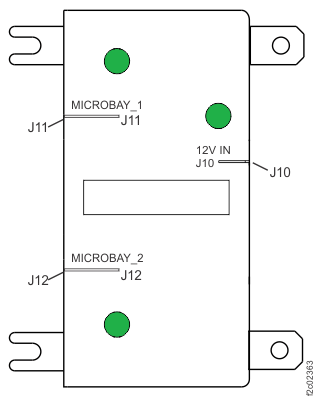
Figure 8. Model 98x direct power junction assembly (direct PJA) locations - E51, E52, E53, and E54
Model 98x direct power junction assembly (direct PJA) locations - E51, E52, E53, and E54

How to exit the MAP to proceed to the Exchange Parts menu

Procedure

  1. Return to the screen that sent you here.
  2. To the question, "What was the result of using the service procedure from Infocenter?" click Delay the repair and then click Next.
  3. The current repair action ends, but the serviceable event is left open. Use the Exchange Parts menu to exchange the targeted FRU (for example, PJA input cable, PJA output cable):
    Storage Facility Management > storage facility > Exchange Parts.

How to exit the MAP and proceed to repair a FRU in the FRU list

Procedure

  1. Return to the screen that sent you here.
  2. To the question, "What was the result of using the service procedure from Infocenter?" click Problem not fixed and then click Next.
  3. To the question, "Did you exchange any parts?" click No and then click Next.
  4. To the question, "Did you isolate the problem"? click No and then click Next.
  5. The next FRU in the list is displayed. Depending upon FRU order list, it might or might not be the targeted FRU. The repair screens allow you to skip a FRU if it is not the one that is targeted for repair. If the FRU that is displayed is not the targeted FRU, then skip it by doing the following steps:
    1. When the next FRU in the list is displayed, pretend that the other FRUs in the previous FRU list are not available onsite to be replaced.
    2. When asked if the FRU is available to be replaced, answer "No, go to the next FRU in the FRU list." This answer causes each FRU in the list to be displayed until the targeted FRU is displayed.
  6. When the targeted FRU is displayed, (for example, PJA, I/O enclosure PCIe and PCN Card) do a normal FRU replace of the targeted FRU.
  7. When the repair is complete, exit this MAP.

Individual microbay LEDs

About this task
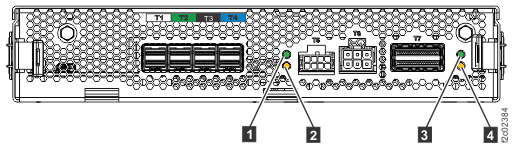
Figure 9. Microbay LEDs
Microbay LEDs
Table 15. Interpreting the LEDs on the microbay
Index LED function Location Color LED Off LED On LED Flash
1 Microbay power P1-C7-Cx Green Power off Power on N/A
2 Microbay identify P1-C7-Cx Amber Normal N/A Microbay identify
3 Microbay PCIe link status P1-C7-Cx-T7 Green Link good Link bad N/A
4 Microbay PCIe port identify P1-C7-Cx-T7 Amber Normal N/A PCIe port identify